
Microsoft
SC-300 exam questions
Microsoft Identity and Access Administrator
Try each question before you reveal its answer.
378 more SC-300 questions with answers $49.00
Unlock all 383 questions-
Question 1 Litware, Inc
Single answer
Case study: Litware, Inc
Litware, IncOverviewLitware, Inc. is a pharmaceutical company that has a subsidiary named fabrikam, inc
Litware has offices in Boston and Seattle, but has employees located across the United States. Employees connect remotely to either office by using a VPN connection.
Identity EnvironmentThe network contains an Active Directory forest named litware.com that is linked to an Azure Active Directory (Azure AD) tenant named litware.com. Azure AD Connect uses pass-through authentication and has password hash synchronization disabled.
Litware.com contains a user named User1 who oversees all application development. Litware implements Azure AD Application Proxy.
Fabrikam has an Azure AD tenant named fabrikam.com. The users at Fabrikam access the resources in litware.com by using gu est accounts in the litware.com tenant.
Cloud EnvironmentAll the users at Litware have Microsoft 365 Enterprise E5 licenses. All the built-in anomaly detection polices in Microsoft Cloud App Security are enabled.
Litware has an Azure subscription associated to the litware.com Azure AD tenant. The subscription contains an Azure Sentinel instance that uses the Azure Active Directory connector and the Office 365 connector. Azure Sentinel currently collects the Azure AD sign-ins logs and audit logs.
On-premises EnvironmentThe on-premises network contains the severs shown in the following table.
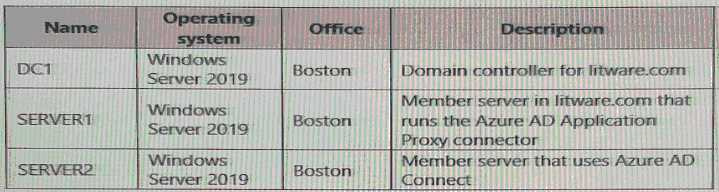
Both Litware offices connect directly to the internet. Both offices connect to virtual networks in the Azure subscription by using a site-to-site VPN connection. All on-premises domain controllers are prevented from accessing the internet.
Delegation RequirementsLitware identifies the following delegation requirements:
* Delegate the management of privileged roles by using Azure AD Privileged Identity Management (PIM).
* Prevent nonprivileged users from registering applications in the litware.com Azure AD tenant-
* Use custom catalogs and custom programs for Identity Governance.
* Ensure that User1 can create enterprise applications in Azure AD. Use the principle of least privilege.
Licensing RequirementsLitware recently added a custom user attribute named LWLicenses to the litware.com Active Directory forest. Litware wants to manage the assignment of Azure AD licenses by modifying the value of the LWLicenses attribute. Users who have the appropriate value for LWLicenses must be added automatically to Microsoft 365 group that he appropriate license assigned.
Management RequirementLitware wants to create a group named LWGroup1 will contain all the Azure AD user accountsfor Litware but exclude all the Azure AD guest accounts.
Authentication RequirementsLitware identifies the following authentication requirements:
• Implement multi-factor authentication (MFA) for all Litware users.
• Exempt users from using MFA to authenticate to Azure AD from the Boston office of Litware.
• Implement a banned password list for the litware.com forest.
• Enforce MFA when accessing on-premises applications.
• Automatically detect and remediate externally leaked credentials
Access RequirementsLitware wants to create a group named LWGroup1 that will contain all the Azure AD user accounts for Litware but exclude all the Azure AD guest accounts.
Monitoring RequirementsLitware wants to use the Fusion rule in Azure Sentinel to detect multi-staged that include a combination of suspicious Azure AD sign-ins followed by anomalous Microsoft Office 365 activity.
You need to meet the authentication requirements for leaked credentials.
What should you do?
Reveal answer
Correct answer
-
C
Enable password hash synchronization in Azure AD Connect.
Explanation
In SC-300, Azure AD Identity Protection is the prescribed control to “automatically detect and remediate externally leaked credentials.” That specific user risk—Leaked credentials—relies on Microsoft comparing known breached username/password pairs with what Azure AD can evaluate. The study materials explain that Identity Protection “detects leaked credentials when Microsoft finds a match with the user’s current credentials,” and also note that password hash synchronization (PHS) can be enabled even if your sign-in method is Pass-through Authentication or federation. A common exam call-out is that without PHS, Azure AD has no hash to compare, so the leaked-credential signal is unavailable. Enabling PHS (you can keep PTA as the active sign-in method) allows Identity Protection to raise user risk and enforce policy actions such as require password change or block access. By contrast, Azure AD Password Protection addresses banned/weak passwords at change time, not breached-credential telemetry; federation choices (e.g., PingFederate) don’t deliver the leaked-credential signal; and authentication method policy controls how users perform MFA (e.g., methods) rather than whether leaked credentials are detected. Therefore, to meet the requirement to “automatically detect and remediate externally leaked credentials,” the minimum correct step is to enable password hash synchronization while retaining PTA—exactly as recommended in SC-300 guidance.
No comments yet. Start the discussion.
-
C
-
Question 2 Litware, Inc
Hotspot
You need to create the LWGroup1 group to meet the management requirements.
How should you complete the dynamic membership rule? To answer, drag the appropriate values to the correct targets. Each value may be used once, more than once, or not at all. You many need to drag the split bar between panes or scroll to view content.
NOTE: Each correct selection is worth one point.

Reveal answer
Correct answer

No comments yet. Start the discussion.
-
Question 3 Datum Corp
Drag and drop
Case study: Datum Corp
Datum CorpOverviewA Datum Environment
The on-premises network of A. Datum contains an Active Directory Domain Services (AD DS) forest named adatum.com.
The tenant contains the users shown in the following table.
Problem Statements• Multiple users in the sales department have up to five devices. The sales department users report that sometimes they must contact the support department to join their devices to the Azure AD tenant because they have reached their device limit.
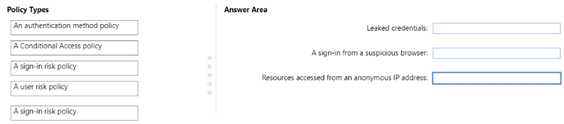
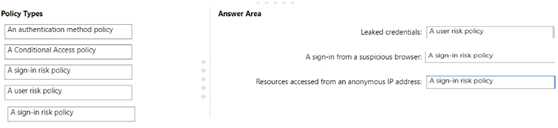
• A recent security incident reveals that several users leaked their credentials, a suspicious browser was used for a sign-in, and resources were accessed from an anonymous IP address,
• When you attempt to assign the Device Administrators role To IT_Group1, the group does NOT appear in the selection list.
• Anyone in the organization can invite guest users, including other guests and non-administrators.
• The helpdesk spends too much time resetting user passwords.
• Users currently use only passwords for authentication.
RequirementsA, Datum plans to implement the following changes;
• Configure self-service password reset {SSPR}.
• Configure multi-factor authentication (MFA) for all users.
• Configure an access review for an access package named Package1.
• Require admin approval for application access to organizational data.
• Sync the AD DS users and groupsoflitware.com with the Azure AD tenant.
• Ensure that only users that are assigned specific admin roles can invite guest users.
• Increase the maximum number of devices that can be joined or registered to Azure AD to 10.
Technical Requirements• Users assigned the User administrator role must be able to request permission to use the role when needed for up to one year.
• Users must be prompted to register for MFA and provided with an option to bypass the registration for a grace period.
• Users must provide one authentication method to reset their password by using SSPR. Available methods must include:
• Email
• Phone
• Security questions
• The Microsoft Authenticator app
• Trust relationships must NOT be established between the adatum.com and litware.com AD DS domains.
• The principle of least privilege must be used.
You need to resolve the recent security incident issues.
What should you configure for each incident? To answer, drag the appropriate policy types to the correct issues. Each policy type may be used once, more than once, or not at all. You may need to drag the split bar between panes or scroll to view content.
NOTE: Each correct selection is worth one point.
Reveal answer
Correct answer
No comments yet. Start the discussion.
-
Question 4 Datum Corp
Multiple answer
You need to modify the settings of the User administrator role to meet the technical requirements. Which two actions should you perform for the role? Each correct answer presents part of the solution. NOTE: Each correct selection is worth one point.
Reveal answer
Correct answer
-
C
Set all assignments to Eligible
-
D
Modify the Expire eligible assignments after setting.
Explanation
In Azure AD Privileged Identity Management (PIM), the SC-300 materials explain that role assignment type determines how a user obtains permissions. An eligible assignment means the user requests activation when needed; an active assignment grants continuous permissions. As the guide states, “Eligible assignments require the user to activate the role for just-in-time access, while active assignments grant standing access.” To allow users of the User administrator role to request the role when needed, you must set assignments to Eligible rather than active.
The same objective also calls for ensuring this capability is available “for up to one year.” In PIM role configuration, the duration of an eligibility is controlled by the Expire eligible assignments after policy. The documentation describes that administrators can “configure the maximum duration for eligible assignments by setting ‘Expire eligible assignments after’ to a specific period (for example, months up to one year).” Therefore, you must modify the “Expire eligible assignments after” setting to the required period.
No requirement mentions activation justification or ticket metadata; those are optional controls used to add context to activations. Consequently, the two actions that directly satisfy the stated technical requirement are: set all assignments to Eligible (C) and configure “Expire eligible assignments after” (D).
No comments yet. Start the discussion.
-
C
-
Question 5 Mix Questions
Ordering
Case study: Mix Questions
Mix QuestionsSC-300 Mix Questions IN THIS CASE STUDYYour company has an Azure Active Directory (Azure AD) tenant named contoso.com.
The company is developing a web service named App1.
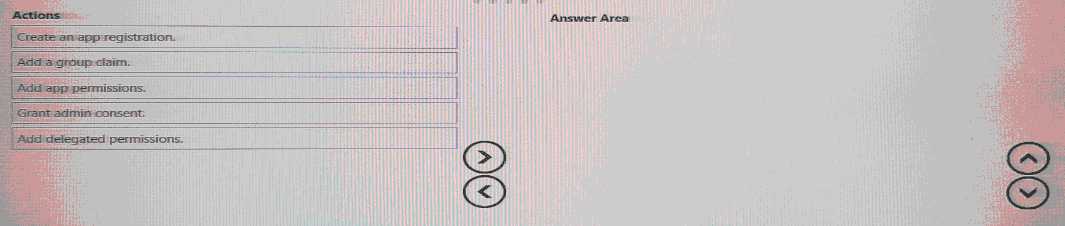
You need to ensure that App1 can use Microsoft Graph to read directory data in contoso.com.
Which three actions should yon perform in sequence? To answer, move the appropriate actions from the list of actions to the answer area and arrange them In the correct order.
Reveal answer
Correct order
-
1
A
Create an app registration
-
2
D
Grant admin consent.
-
3
C
Add app permissions.
No comments yet. Start the discussion.
-
1
A
- Unlock to see this question
- Unlock to see this question
378 questions locked
Unlock all 383 SC-300 questions
You have tried 5 for free. The other 378 work the same way: answer first, then check.
- Questions
- 383, each with its answer
- Explanations
- 57% of questions explained
- Formats
- Single answer, Hotspot, Drag and drop, Multiple answer, Ordering
- Version
- 44.9
- Access
- 3 months from purchase
One-time payment
$49.00
Secure checkout