
Dell EMC
D-VPX-DY-A-24 exam questions
Dell VPLEX Deploy Achievement
Try each question before you reveal its answer.
55 more D-VPX-DY-A-24 questions with answers $49.00
Unlock all 60 questions-
Question 1
Single answer
LUNs belonging to an ESXi cluster were encapsulated behind VPLEX. What information must be shared with the ESXi administrator so that they can re-discover the datastore
and the RDM LUNs?
Reveal answer
Correct answer
-
C
Virtual volume VPD
Explanation
When LUNs belonging to an ESXi cluster are encapsulated behind VPLEX, the ESXi administrator needs to be provided with the Virtual Volume Page Data (VPD) of the virtual volumes. The VPD contains metadata about the virtual volumes that allows the ESXi host to properly identify and interact with them.
Encapsulation Process: During the encapsulation process, the physical LUNs are virtualized and presented as virtual volumes through VPLEX. This process involves the VPLEX claiming the LUNs and presenting them to the ESXi hosts as new devices1.
Re-discovery of Datastore and RDM LUNs: After encapsulation, the ESXi administrator must perform a rescan of the storage adapters to discover the new virtual volumes. The VPD of the virtual volumes, which includes information such as the device identifiers and characteristics, is crucial for the ESXi host to recognize and mount the datastores and RDM LUNs2.
Importance of VPD: The VPD is essential because it provides the ESXi host with the necessary information to differentiate between the virtual volumes and other storage devices. Without the VPD, the ESXi host may not be able to properly identify the encapsulated LUNs, leading to issues with datastore accessibility1.
Best Practices: It is recommended to follow the best practices and required configurations for a vSphere Metro Storage Cluster using EMC VPLEX Storage array as outlined in VMware KB articles and Dell support documents. This ensures a smooth encapsulation process and proper functioning of the ESXi hosts with the VPLEX storage volumes1.
In summary, sharing the Virtual Volume VPD with the ESXi administrator is a critical step in ensuring that the ESXi cluster can successfully re-discover the datastore and the RDM LUNs after they have been encapsulated behind VPLEX.
No comments yet. Start the discussion.
-
C
-
Question 2
Multiple answer
ORDERLIST
What is the correct order of steps to create and operate a custom monitor?

Reveal answer
Correct answer
-
A
Gather monitor files, or monitor output on the console
-
B
Determine type and frequency of statistics to collect
-
C
Add one or more sinks to the monitor
-
D
Create a monitor
-
E
Collect statistics
No comments yet. Start the discussion.
-
A
-
Question 3
Single answer
What is a benefit of using AppSync with VPLEX and XtremIO?
Reveal answer
Correct answer
-
C
Take application consistent snapshots on XtremlO with VPLEX in the data path
Explanation
AppSync is a software that allows for application-consistent snapshots, which are crucial for ensuring that data is in a consistent state when a snapshot is taken. This is particularly important for applications that require a consistent set of data, like databases.
Application-Consistent Snapshots: AppSync enables the creation of application-consistent snapshots on XtremIO storage arrays. This means that the snapshots reflect the exact state of the application at the point in time when the snapshot was taken1.
Integration with VPLEX: When used with VPLEX, AppSync allows for these application-consistent snapshots to be taken even when the storage is virtualized behind VPLEX. This ensures that the benefits of both VPLEX virtualization and XtremIO’s powerful snapshot capabilities can be utilized together1.
Benefits for Application Owners: For application owners, this integration means that they can have confidence in the consistency of their data when using these snapshots for purposes such as development, testing, or backup and recovery1.
Operational Efficiency: The ability to take application-consistent snapshots on XtremIO with VPLEX in the data path simplifies operations. It allows for efficient use of storage resources and reduces the complexity of managing snapshots across different storage systems1.
Use Cases: This capability is particularly beneficial for environments running critical applications such as databases, where having consistent snapshots is essential for tasks like replication, data recovery, and testing1.
In summary, the key benefit of using AppSync with VPLEX and XtremIO is the ability to take application-consistent snapshots on XtremIO while VPLEX is in the data path, providing a reliable and efficient way to manage snapshots for critical applications.
No comments yet. Start the discussion.
-
C
-
Question 4
Single answer
A storage administrator has just been informed by their network team that a WAN outage has been restored.
How can the administrator verify that their VPLEX Metro WAN COM link is restored?
Reveal answer
Correct answer
-
D
Run connectivity validate-local-com
Explanation
To verify that the VPLEX Metro WAN COM link is restored, the storage administrator should run the connectivity validate-local-com command. This command checks the connectivity status of the local communication links within the VPLEX cluster.
Command Execution: The administrator should access the VPLEX CLI and execute the connectivity validate-local-com command. This will initiate a check of the local COM ports’ connectivity status1.
Interpreting Results: After running the command, the administrator should review the output to verify that all expected connectivity is present. The output will indicate whether each local COM port is communicating as expected1.
WAN COM Link: The WAN COM link is responsible for the communication between VPLEX clusters over a wide area network. Ensuring that the local COM links are operational is a prerequisite for the WAN COM link to function properly1.
Post-Outage Verification: Following a WAN outage, it’s crucial to confirm that the communication links are fully operational to maintain the high availability and data mobility features of VPLEX Metro1.
Best Practices: It is recommended to follow the Dell EMC VPLEX best practices for post-outage recovery, which include running the connectivity validate-local-com command to ensure that the system is ready to resume normal operations1.
In summary, the connectivity validate-local-com command is the correct procedure to verify that the VPLEX Metro WAN COM link is restored, as it checks and confirms the presence of all expected local communication link connectivity within the VPLEX cluster.
No comments yet. Start the discussion.
-
D
-
Question 5
Single answer
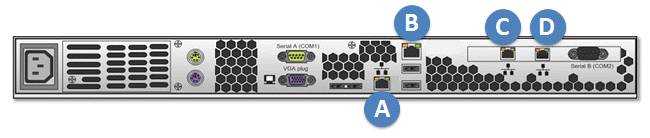
Refer to the exhibit.
A storage administrator is experiencing an unplanned site outage. After recovery of the network, they are still unable to access the management server. Which port on the back of the management server can the administrator connect to with a hardcoded IP address to access the VPLEX cluster and troubleshoot the issue?
Reveal answer
Correct answer
-
B
A
Explanation
In the event of an unplanned site outage and subsequent recovery, if a storage administrator is unable to access the management server, they can connect to a specific port on the back of the management server with a hardcoded IP address to regain access to the VPLEX cluster and begin troubleshooting.
Identify the Management Port: The management server typically has a dedicated port that can be used for direct access in case of network issues. This port is designed to accept a hardcoded IP address for such scenarios1.
Connect to the Management Port: The administrator should use an Ethernet cable to connect a laptop or a computer directly to the management port, which is usually labeled and can be identified based on the server’s hardware manual or documentation1.
Configure the Hardcoded IP Address: On the connected device, the administrator needs to configure a static IP address that is in the same subnet as the management server’s default IP range1.
Access the VPLEX CLI: Once the connection is established, the administrator can use SSH or a similar protocol to access the VPLEX Command Line Interface (CLI) through the hardcoded IP address1.
Troubleshoot the Issue: With access to the VPLEX CLI, the administrator can now run diagnostic commands, check the system status, and troubleshoot the connectivity issue1.
In this scenario, the correct port to connect to is labeled ‘A’ on the back of the management server. This port is reserved for such direct access and allows the administrator to bypass the network to troubleshoot and resolve the issue.
No comments yet. Start the discussion.
-
B
- Unlock to see this question
- Unlock to see this question
55 questions locked
Unlock all 60 D-VPX-DY-A-24 questions
You have tried 5 for free. The other 55 work the same way: answer first, then check.
- Questions
- 60, each with its answer
- Explanations
- 92% of questions explained
- Formats
- Single answer, Multiple answer
- Version
- 6.0
- Access
- 3 months from purchase
One-time payment
$49.00
Secure checkout