
Microsoft
AB-650 exam questions
Administering Microsoft 365 and AI Services
Try each question before you reveal its answer.
85 more AB-650 questions with answers $49.00
Unlock all 90 questions-
Question 1 Contoso Ltd
Hotspot
Case study: Contoso Ltd
Contoso LtdOverviewContoso, Ltd. is a consulting company that has a main office in San Francisco and a branch office in Dallas.
Existing EnvironmentMicrosoft Entra configuration
Contoso has an Azure subscription.
Contoso has a Microsoft 365 E5 subscription.
Contoso has a Microsoft Entra tenant named contoso.com. The tenant has an administrative unit named AU1 that contains the following membership rule.
(device.deviceTrustType –eq “Workplace”) and (device.deviceOSType –in [“Windows”, “Android”])
The tenant contains the cloud-only users shown in the following table.
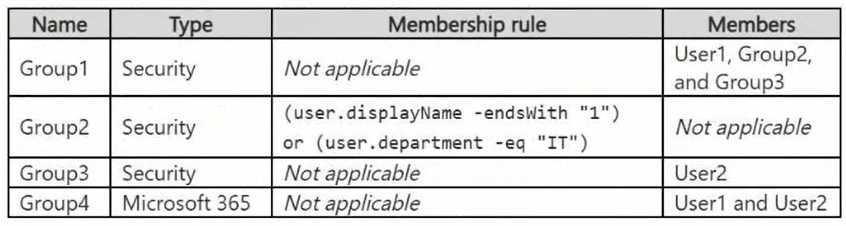
All the devices are managed by using Microsoft Intune.
Microsoft Entra authentication methods
Contoso contains an Authentication methods policy for Microsoft Authenticator that has the following settings:
Include: Group1
Exclude: Group3
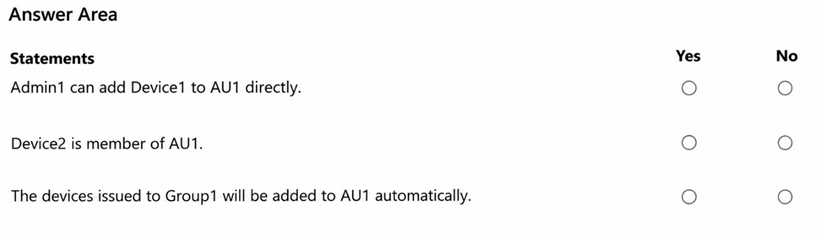
Authentication mode: PasswordlessYou need to evaluate the configuration of AU1.
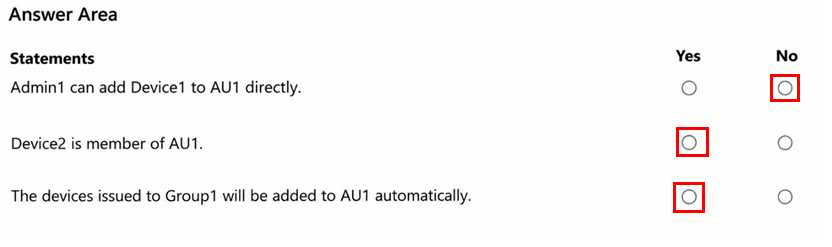
For each of the following statements, select Yes if the statement is true. Otherwise, select No.
NOTE: Each correct selection is worth one point.
Reveal answer
Correct answer
No comments yet. Start the discussion.
-
Question 2 Contoso Ltd
Single answer
You need to meet the technical requirements for the project documents.
What should you create in Microsoft Purview?
Reveal answer
Correct answer
-
D
a data loss prevention (DLP) policy
Explanation
Microsoft Purview Data Loss Prevention (DLP) provides controls to prevent Microsoft 365 Copilot from processing sensitive organizational content when generating responses.
Option D is correct because the Contoso technical requirement explicitly states that Microsoft 365 Copilot responses must not use content from project documents stored on SharePoint Site1.
Microsoft Purview supports a dedicated Microsoft 365 Copilot and Copilot Chat DLP policy location. Administrators can configure a DLP rule using the Content contains → Sensitivity labels condition and the Prevent Copilot from processing content action.
This prevents Copilot from processing files with the specified sensitivity labels or incorporating their contents into generated responses, even when users have SharePoint permissions.
For Contoso, the project documents can be identified using their distinctive project-code format, PR-123456789, and classified with an appropriate sensitivity label. The DLP policy can then exclude those labeled documents from Copilot processing.
Option A is incorrect as a complete solution because sensitivity labels and auto-labeling policies classify and protect documents but do not independently enforce the required Copilot processing restriction.
Option B is incorrect because Insider Risk Management detects potentially risky user activities.
Option C is incorrect because Information Barriers restrict communication and collaboration between designated user segments.
Technical consideration: The DLP policy requires an appropriate sensitivity label to be applied to the project documents. DLP rules for Copilot cannot directly exclude stored files merely by matching their project-code pattern.
Therefore, a DLP policy is the required enforcement mechanism.
No comments yet. Start the discussion.
-
D
-
Question 3 Mix Questions
Drag and drop
Case study: Mix Questions
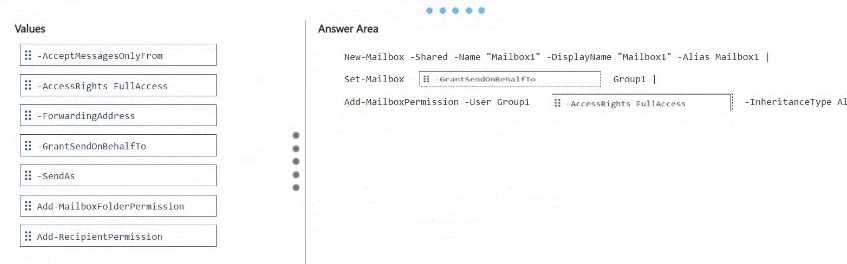
Mix QuestionsAB-650 Mix Questions IN THIS CASE STUDYYou have a Microsoft 365 subscription that uses Microsoft Exchange. The subscription contains a mail-enabled security group named Group1.
You manage recipients by using Exchange Online PowerShell.
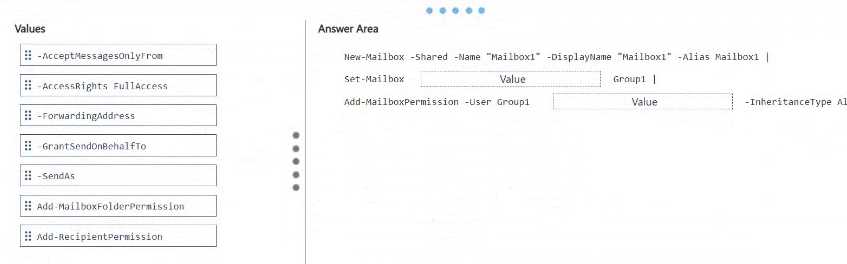
You need to create a shared mailbox named Mailbox1. The solution must meet the following requirements:
The users in Group1 must be able to open Mailbox1, create mailbox items, and modify the mailbox items.
The Group1 users must be able to send messages from Mailbox1, and recipients must be able to identify the individual sender.
How should you complete the PowerShell command? To answer, drag the appropriate values to the correct targets. Each value may be used once, more than once, or not at all. You may need to drag the split bar between panes or scroll to view content.
NOTE: Each correct selection is worth one point.
Reveal answer
Correct answer
No comments yet. Start the discussion.
-
Question 4 Mix Questions
Multiple answer
You have a Microsoft 365 E5 subscription that uses Microsoft Exchange. The subscription contains a mail-enabled security group named Group1 and a user named User1.
User1 has a mailbox named Mailbox1 that is 42 GB in size.
User1 is transferred to a new role and will no longer use Mailbox1.
You need to modify Mailbox1 to meet the following requirements:
Preserve access to historical email.
Enable the users in Group1 to open Mailbox1.
Enable the Group1 users to send email messages that appear to be sent from Mailbox1.
Which two actions should you perform? Each correct answer presents part of the solution.
NOTE: Each correct selection is worth one point.
Reveal answer
Correct answer
-
B
Grant Group1 Full Access and Send As permissions on Mailbox1.
-
C
Convert Mailbox1 into a shared mailbox.
Explanation
Microsoft Exchange Online supports converting an existing user mailbox to a shared mailbox while retaining its historical email content. This is appropriate when the original user no longer needs direct access but other employees must continue using the mailbox.
Option C is correct because converting Mailbox1 into a shared mailbox preserves the existing email messages and enables delegated access for other users.
The mailbox contains 42 GB of data, which is below the standard 50 GB unlicensed shared mailbox limit. Therefore, an additional mailbox license is not required solely because of its current size, provided no separately licensed features are necessary.
Option B is correct because Full Access permission allows Group1 members to open the mailbox and manage existing items. Send As permission enables them to send messages that appear to originate directly from Mailbox1.
Option E is incorrect because Send on Behalf permission displays the individual delegate's identity, whereas the requirement specifies that messages must appear to come from Mailbox1.
Option D is incorrect because Litigation Hold is designed for preservation and compliance purposes, not for providing collaborative mailbox access.
Option A is unnecessary for a standard shared mailbox of this size.
Therefore, converting the mailbox and granting Full Access and Send As permissions satisfies all three requirements.
Microsoft Reference:
https://learn.microsoft.com/microsoft-365/admin/email/convert-user-mailbox-to-shared-mailbox
https://learn.microsoft.com/en-us/exchange/collaboration/shared-mailboxes/create-shared-mailboxes
No comments yet. Start the discussion.
-
B
-
Question 5 Mix Questions
Drag and drop
You have a Microsoft 365 subscription.
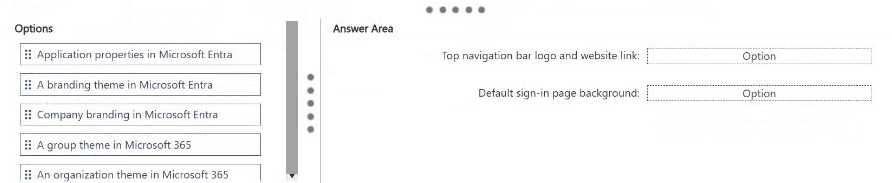
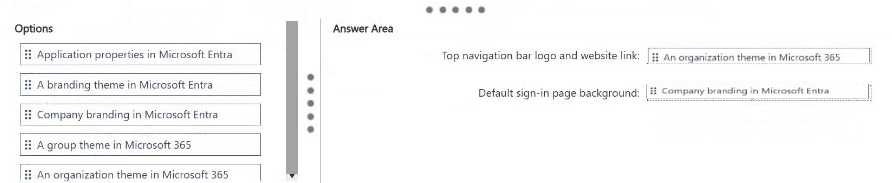
You need to configure branding for the subscription. The solution must meet the following requirements:
Display the company logo on the Microsoft 365 top navigation bar and link the logo to your company's website.
Display a background image on the default sign-in page for all users.
Which branding options should you use for each requirement? To answer, drag the appropriate options to the correct requirements. Each option may be used once, more than once, or not at all. You may need to drag the split bar between panes or scroll to view content.
Reveal answer
Correct answer
No comments yet. Start the discussion.
- Unlock to see this question
- Unlock to see this question
85 questions locked
Unlock all 90 AB-650 questions
You have tried 5 for free. The other 85 work the same way: answer first, then check.
- Questions
- 90, each with its answer
- Explanations
- 51% of questions explained
- Formats
- Single answer, Hotspot, Drag and drop, Multiple answer
- Version
- 6.1
- Access
- 3 months from purchase
One-time payment
$49.00
Secure checkout